这是server.yaml 的配置,config-sharding.yaml 的配置是什么样的?
schemaName: sharding_db2
dataSources:
  dss_0:

    connectionTimeoutMilliseconds: 30000
    idleTimeoutMilliseconds: 60000
    maxLifetimeMilliseconds: 1800000
    maxPoolSize: 50
    minPoolSize: 1
  dss_1:


    connectionTimeoutMilliseconds: 30000
    idleTimeoutMilliseconds: 60000
    maxLifetimeMilliseconds: 1800000
    maxPoolSize: 50
    minPoolSize: 1

rules:
  - !SHARDING
    tables:
      tbl_db_migrate_record:
        actualDataNodes: dss_${0..1}.tbl_db_migrate_record
        keyGenerateStrategy:
          column: id
          keyGeneratorName: snowflake
      t_order:
        actualDataNodes: ds_${0..1}.t_order_${0..1}
        tableStrategy:
          standard:
            shardingColumn: order_id
            shardingAlgorithmName: t_order_inline
        keyGenerateStrategy:
          column: order_id
          keyGeneratorName: snowflake
      t_order_item:
        actualDataNodes: ds_${0..1}.t_order_item_${0..1}
        tableStrategy:
          standard:
            shardingColumn: order_id
            shardingAlgorithmName: t_order_item_inline
        keyGenerateStrategy:
          column: order_item_id
          keyGeneratorName: snowflake
    bindingTables:
      - t_order,t_order_item
    defaultDatabaseStrategy:
      standard:
        shardingColumn: id
        shardingAlgorithmName: database_inline
    defaultTableStrategy:
      none:

    shardingAlgorithms:
      database_inline:
        type: INLINE
        props:
          algorithm-expression: dss_${id % 2}
      t_order_inline:
        type: INLINE
        props:
          algorithm-expression: t_order_${order_id % 2}
      t_order_item_inline:
        type: INLINE
        props:
          algorithm-expression: t_order_item_${order_id % 2}

    keyGenerators:
      snowflake:
        type: SNOWFLAKE

    scalingName: default_scaling
    scaling:
      default_scaling:
        input:
          workerThread: 40
          batchSize: 1000
        output:
          workerThread: 40
          batchSize: 1000
        streamChannel:
          type: MEMORY
          props:
            block-queue-size: 10000
        completionDetector:
          type: IDLE
          props:
            incremental-task-idle-minute-threshold: 30
        dataConsistencyChecker:
          type: DATA_MATCH
          props:
            chunk-size: 1000
schemaName: sharding_db
dataSources:
  ds_0:


    connectionTimeoutMilliseconds: 30000
    idleTimeoutMilliseconds: 60000
    maxLifetimeMilliseconds: 1800000
    maxPoolSize: 50
    minPoolSize: 1
  ds_1:


    connectionTimeoutMilliseconds: 30000
    idleTimeoutMilliseconds: 60000
    maxLifetimeMilliseconds: 1800000
    maxPoolSize: 50
    minPoolSize: 1

  ds_2:


    connectionTimeoutMilliseconds: 30000
    idleTimeoutMilliseconds: 60000
    maxLifetimeMilliseconds: 1800000
    maxPoolSize: 50
    minPoolSize: 1

  shadow_ds_0:


    connectionTimeoutMilliseconds: 30000
    idleTimeoutMilliseconds: 60000
    maxLifetimeMilliseconds: 1800000
    maxPoolSize: 50
    minPoolSize: 1

  shadow_ds_1:


    connectionTimeoutMilliseconds: 30000
    idleTimeoutMilliseconds: 60000
    maxLifetimeMilliseconds: 1800000
    maxPoolSize: 50
    minPoolSize: 1
rules:
  - !READWRITE_SPLITTING
    dataSources:
      rw_ds_0:
        type: Static
        props:
          write-data-source-name: ds_0
          read-data-source-names: shadow_ds_0
      rw_ds_1:
        type: Static
        props:
          write-data-source-name: ds_1
          read-data-source-names: shadow_ds_1
  - !SHARDING
    tables:
      tbl_db_migrate_record:
        actualDataNodes: rw_ds_${0..1}.tbl_db_migrate_record , ds_2.tbl_db_migrate_record
        #      actualDataNodes: ds_${0..1}.tbl_db_migrate_record
        keyGenerateStrategy:
          column: id
          keyGeneratorName: snowflake
        databaseStrategy:
          standard:
            shardingColumn: id
            shardingAlgorithmName: database_inline
        #        hint:
        #          shardingAlgorithmName: database-defaults
        tableStrategy:
          standard:
            shardingColumn: id
            shardingAlgorithmName: database_inline2
      t_order:
        actualDataNodes: ds_${0..1}.t_order_${0..1}
        tableStrategy:
          standard:
            shardingColumn: order_id
            shardingAlgorithmName: t_order_inline
        keyGenerateStrategy:
          column: order_id
          keyGeneratorName: snowflake
      t_order_item:
        actualDataNodes: ds_${0..1}.t_order_item_${0..1}
        tableStrategy:
          standard:
            shardingColumn: order_id
            shardingAlgorithmName: t_order_item_inline
        keyGenerateStrategy:
          column: order_item_id
          keyGeneratorName: snowflake

    bindingTables:
      - t_order,t_order_item
    defaultDatabaseStrategy:
      standard:
        shardingColumn: id
        shardingAlgorithmName: database_inline
    defaultTableStrategy:
      none:

    shardingAlgorithms:
      database_inline:
        type: INLINE
        props:
          algorithm-expression: rw_ds_${id % 2}
          allow-range-query-with-inline-sharding: true
      database_inline2:
        type: INLINE
        props:
          algorithm-expression: tbl_db_migrate_record
          allow-range-query-with-inline-sharding: true
      t_order_inline:
        type: INLINE
        props:
          algorithm-expression: t_order_${order_id % 2}
      t_order_item_inline:
        type: INLINE
        props:
          algorithm-expression: t_order_item_${order_id % 2}
      database-defaults:
        type: HINT_INLINE
        props:
          algorithm-expression: ${value}
    keyGenerators:
      snowflake:
        type: SNOWFLAKE

    scalingName: default_scaling
    scaling:
      default_scaling:
        input:
          workerThread: 40
          batchSize: 1000
        output:
          workerThread: 40
          batchSize: 1000
        streamChannel:
          type: MEMORY
          props:
            block-queue-size: 10000
        completionDetector:
          type: IDLE
          props:
            incremental-task-idle-minute-threshold: 30
        dataConsistencyChecker:
          type: DATA_MATCH
          props:
            chunk-size: 1000
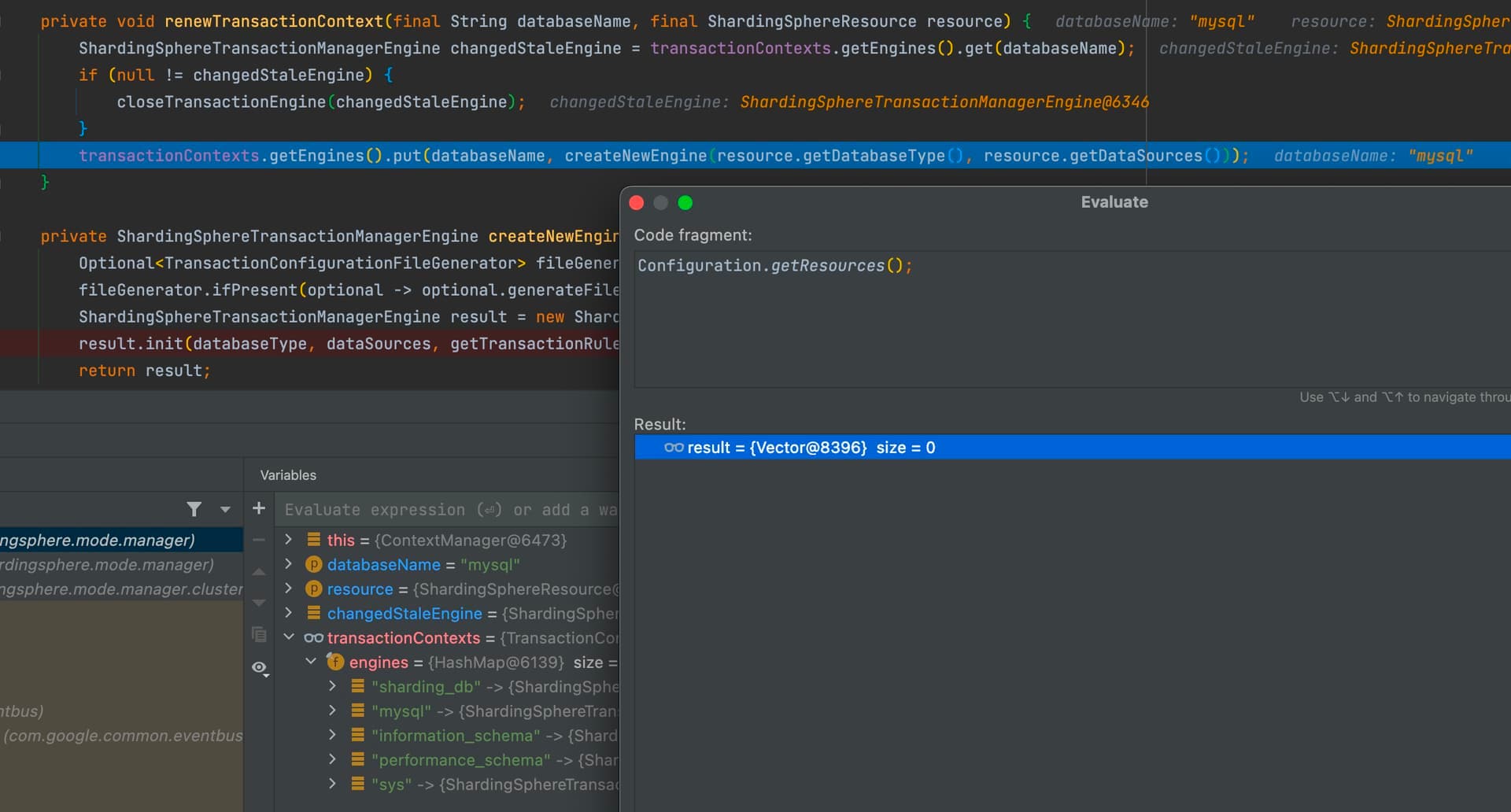
shardingdb2之前是ds ,改成dss 区分,结果shardingdb2也包含ds1、ds2 。不仅如此,系统库都包含
NPE 那个地方,datasourceName 是什么?是 sharding_db,sharding_db2中的一个吗?
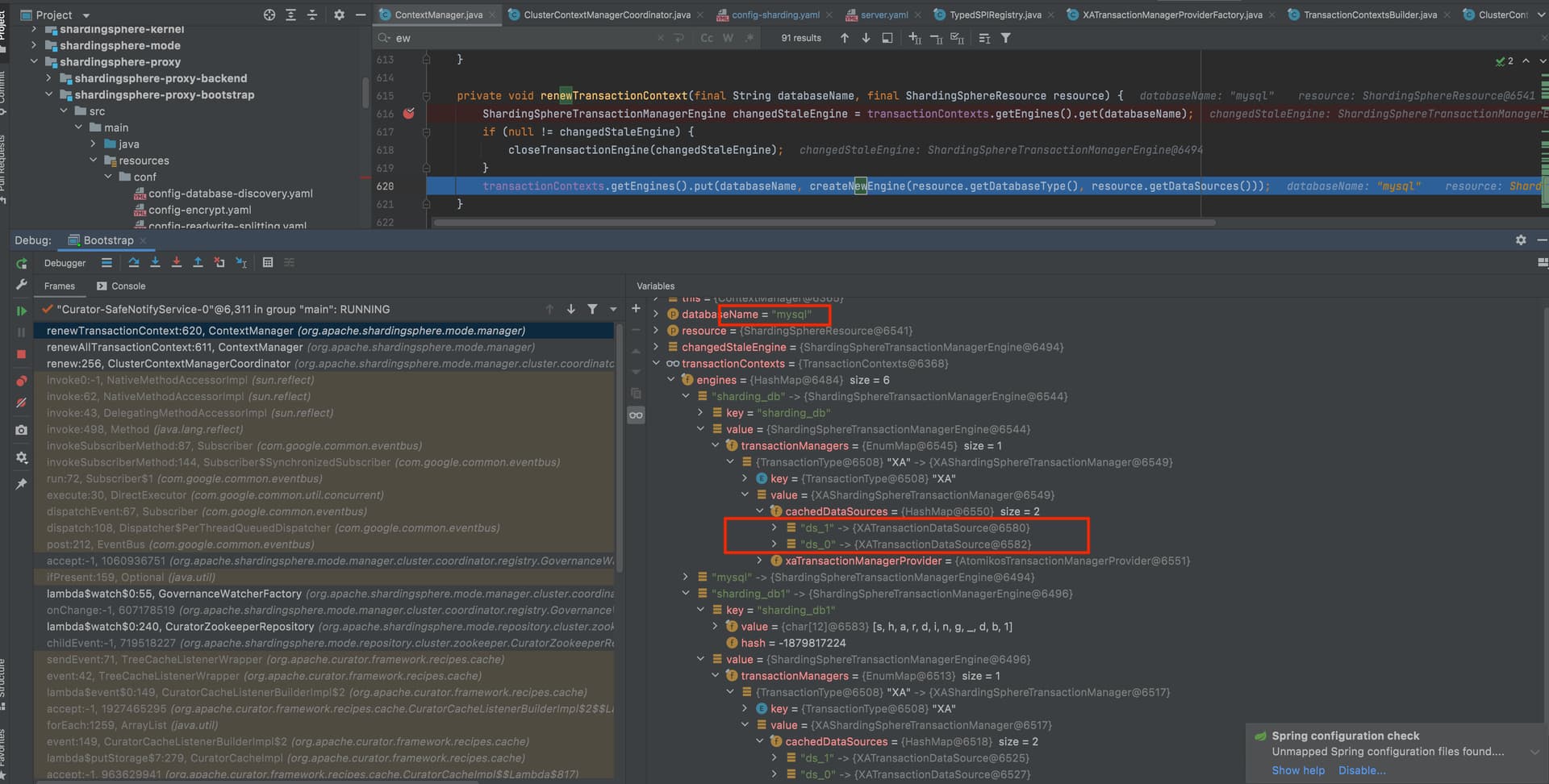
是的,你use db 选择哪个, 就会从transactionManager中拿到datasourceName 对应的engine
cachedatasource 中只有sharding_db 的?
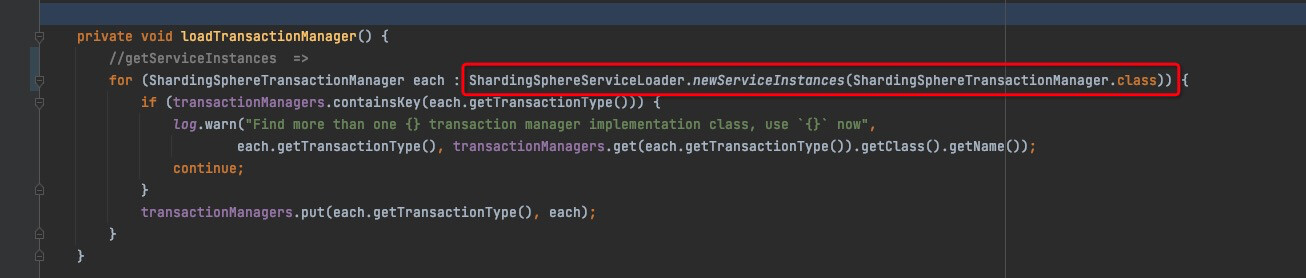

现在仍然是一个逻辑db的XA事务正常,另一个错误
5.1.1 出现同样错误,但是我在测试过程中lastest版本 时而正常时而错误,没有任何配置修改,就很奇怪
cachedatasource 中只有sharding_db 的? 是的 ,是这个情况
在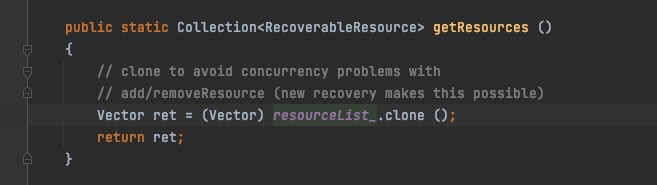
resourceList里只有一个shardingdb里数据库,应该同时存在两个的,问题出在这
Configuration.resourceList_
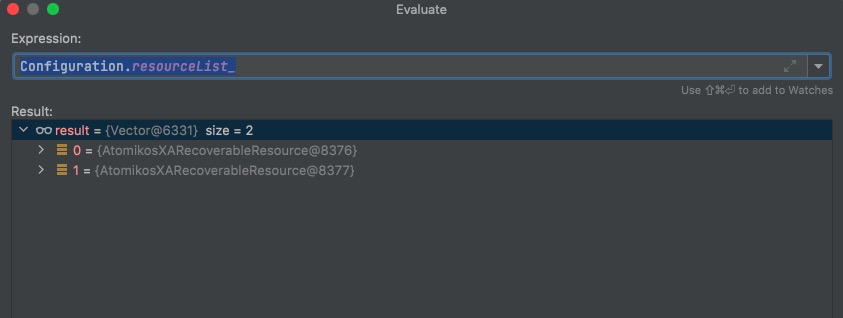
启动的时候有七个编号1-7,连接进去只有两个了编号13-14
Curator-SafeNotifyService-0 线程执行了close 方法,执行了七次,把7个全部close
能提供建库建表语句等信息吗?我复现一下,或者使用最新代码打个包试下(我在最新版本上试的,没有复现),
hello,
我也遇到了同样的问题,我用的最新代码,只配置了一个逻辑库,只要使用事务就会报错。
复现脚本:
use sharding_db;
create table t_order(order_id int primary key);
begin;
select * from t_order;
[HY000][1815] Internal error: javax.transaction.SystemException: There is no registered resource that can recover the given XAResource instance. Please register a corresponding resource first.
我的配置:
server.yaml
mode:
  type: Cluster
  repository:
    type: ZooKeeper
    props:
      namespace: governance_ds
      server-lists: localhost:2181
      retryIntervalMilliseconds: 500
      timeToLiveSeconds: 60
      maxRetries: 5
      operationTimeoutMilliseconds: 500
  overwrite: true

rules:
  - !AUTHORITY
    users:
      - root@%:root
      - sharding@:sharding
    provider:
      type: ALL_PERMITTED
  - !TRANSACTION
    defaultType: XA
    providerType: Atomikos
  - !SQL_PARSER
    sqlCommentParseEnabled: true
    sqlStatementCache:
      initialCapacity: 2000
      maximumSize: 65535
      concurrencyLevel: 4
    parseTreeCache:
      initialCapacity: 128
      maximumSize: 1024
      concurrencyLevel: 4

props:
  max-connections-size-per-query: 1
  kernel-executor-size: 16  # Infinite by default.
  proxy-frontend-flush-threshold: 128  # The default value is 128.
  proxy-hint-enabled: false
  sql-show: true
  check-table-metadata-enabled: false
  show-process-list-enabled: false
    # Proxy backend query fetch size. A larger value may increase the memory usage of ShardingSphere Proxy.
    # The default value is -1, which means set the minimum value for different JDBC drivers.
  proxy-backend-query-fetch-size: -1
  check-duplicate-table-enabled: false
  proxy-frontend-executor-size: 0 # Proxy frontend executor size. The default value is 0, which means let Netty decide.
    # Available options of proxy backend executor suitable: OLAP(default), OLTP. The OLTP option may reduce time cost of writing packets to client, but it may increase the latency of SQL execution
    # and block other clients if client connections are more than `proxy-frontend-executor-size`, especially executing slow SQL.
  proxy-backend-executor-suitable: OLAP
  proxy-frontend-max-connections: 0 # Less than or equal to 0 means no limitation.
  sql-federation-enabled: false
    # Available proxy backend driver type: JDBC (default), ExperimentalVertx
  proxy-backend-driver-type: JDBC
#  proxy-mysql-default-version: 5.7.22 # In the absence of schema name, the default version will be used.
  proxy-default-port: 3307 # Proxy default port.
config-sharding.yaml
databaseName: sharding_db

dataSources:
  ds_0:
    url: jdbc:mysql://127.0.0.1:3306/ds0?allowPublicKeyRetrieval=true&useSSL=false
    username: root
    password: 123456
    connectionTimeoutMilliseconds: 30000
    idleTimeoutMilliseconds: 60000
    maxLifetimeMilliseconds: 1800000
    maxPoolSize: 50
    minPoolSize: 1
  ds_1:
    url: jdbc:mysql://127.0.0.1:3306/ds1?allowPublicKeyRetrieval=true&useSSL=false
    username: root
    password: 123456
    connectionTimeoutMilliseconds: 30000
    idleTimeoutMilliseconds: 60000
    maxLifetimeMilliseconds: 1800000
    maxPoolSize: 50
    minPoolSize: 1

rules:
- !SHARDING
  tables:
    t_order:
      actualDataNodes: ds_${0..1}.t_order_${0..1}
      tableStrategy:
        standard:
          shardingColumn: order_id
          shardingAlgorithmName: t_order_inline
      keyGenerateStrategy:
        column: order_id
        keyGeneratorName: snowflake
    t_order_item:
      actualDataNodes: ds_${0..1}.t_order_item_${0..1}
      tableStrategy:
        standard:
          shardingColumn: order_id
          shardingAlgorithmName: t_order_item_inline
      keyGenerateStrategy:
        column: order_item_id
        keyGeneratorName: snowflake
    t_user:
      actualDataNodes: ds_${0..1}.t_user
  bindingTables:
    - t_order,t_order_item
  defaultDatabaseStrategy:
    standard:
      shardingColumn: user_id
      shardingAlgorithmName: database_inline
  defaultTableStrategy:
    none:

  shardingAlgorithms:
    database_inline:
      type: INLINE
      props:
        algorithm-expression: ds_${user_id % 2}
    t_order_inline:
      type: INLINE
      props:
        algorithm-expression: t_order_${order_id % 2}
    t_order_item_inline:
      type: INLINE
      props:
        algorithm-expression: t_order_item_${order_id % 2}

  keyGenerators:
    snowflake:
      type: SNOWFLAKE
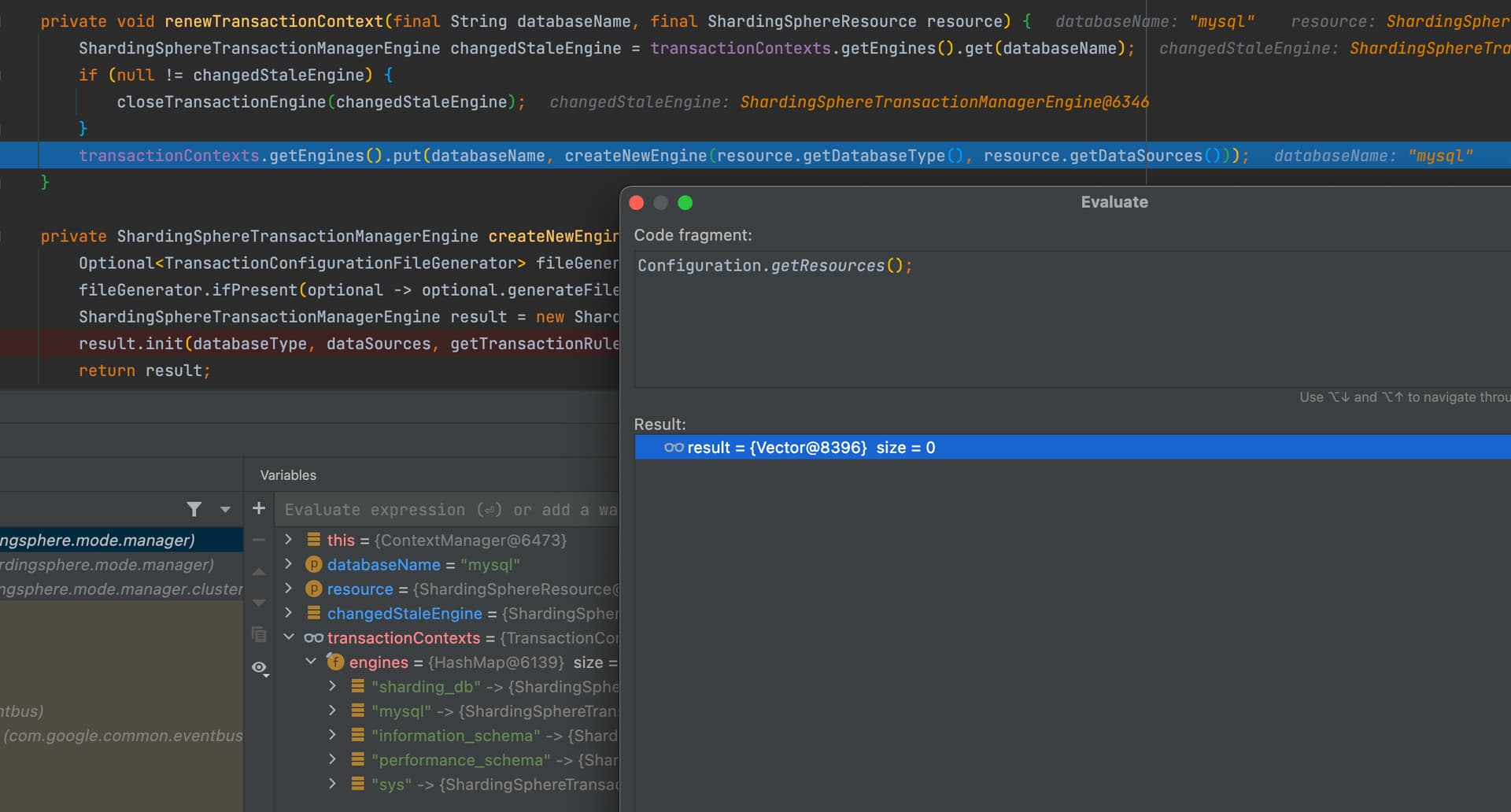
虽然系统库清除后,不会影响其他库对应的XAShardingSphereTransactionManager里的cachedDataSources,但是因为调用userTransactionService.shutdown(true)确实把Configuration.resourceList_给清空了,导致执行transaction.enlistResource时因为Configuration.getResources()返回空集合而报错。
我复现了,Atomikos 的xa,应该受到最近代码的影响,我查下,可以使用 Narayana 的 XA,我试了,可以使用, Narayana 模式,功能最完善
问题出在atomikos的configuration里,不在engines那里。关注configuration中数据的变化,主要是close导致的,GitHub上我提了个issues.
1 个赞